Just the rallies, cut automatically.
Upload your match video. The AI cuts the downtime between points.
Try it free Open my matchesUpload and watch in your browser.
Phone, camcorder or GoPro.
99% recall (our own testing). How we measured
Then US$9.99/month.
Cut all the
waiting around.
How it works
See the four steps on the real screens.Four steps to a rallies-only video.
-
1Choose a video
Just pick the video as you recorded it on your phone. Long matches are fine.
 round1.mp427 min · 217 MBUpload complete
-
2AI analyzes it
You can close the page while it works. We will let you know by email and browser notification when it is done.
Inplay · nowYour analysis is readyClub Open, Round 1: 54 rallies found. -
3Watch the rallies
Press play and the rallies run back to back. Tap any rally to jump to it.
● Playing rallies onlySkip the downtime27 min → 11 min -
4Save and share
Save the rallies-only video, or send a link to your coach or family.
Rallies-only videoMP4 · 11 minSaveShare with your coach or familyinplaytennis.com/s/k8Q2x…CopyOnly people with the link can view it
- 1Choose a video
Pick the video as you recorded it, from your phone or computer. Long matches are fine.
- 2AI analyzes it
You can close the page while it works. We will let you know by email and browser notification when it is done.
- 3Watch the rallies
Press play and the rallies run back to back. Tap any rally to jump to it.
- 4Save and share
Save the rallies-only video, or send a link to your coach or family.
How to film so the AI
can find the rallies
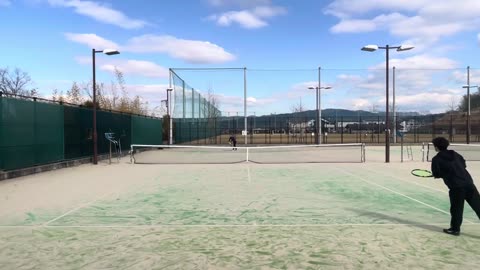
Where you put the camera affects how reliably rallies are found and how easy the video is to watch.


- In landscape
Turn your phone sideways.
- From a high spot
As high as you can. About 2 m is ideal (extend a tripod, mount it on a fence, etc.).
- Behind the court, in the middle
Get both baselines in the frame.
More on phone placement and settings: our phone filming guide. For doubles: filming doubles.
Accuracy and FAQ
Answers to what people ask before they film or upload, based on our terms and how the service actually works.
How many rallies does it miss, and how many false detections are there?
It misses about 1% of rallies (99% recall). It sometimes picks up moments that are not rallies, and you can delete those from the list. This comes from our own testing on 16 matches not used for training (1,599 rallies), and results vary with filming conditions.
How long does the analysis take?
Usually a few minutes to a few tens of minutes after the upload finishes, depending on the length of the video and how busy the service is. The upload itself depends on your connection. You can close the page while it works, and we will let you know by email and browser notification when it is done.
Which cameras work, and can I upload from my phone's browser?
Phones, camcorders and GoPros all work, as long as you have a video file. Formats such as mp4, mov, m4v, mkv and mts are accepted, up to 60 GB per video. You can upload from your phone's browser (the latest Safari, Chrome and similar), but videos are large, so we recommend a computer. If you upload from a phone, use Wi-Fi. The easiest footage for the AI is filmed in landscape, from a high spot, behind the court in the middle.
Who can see a video that shows my opponent?
Only the account that uploaded the video, and anyone who has a share link that the uploader created. People with a share link can watch without logging in. You can choose an expiry of 1 to 30 days for a link, and you can turn it off at any time. We cannot stop someone who receives a link from screen-recording it, so be careful who you share it with. The operator may look at the content to investigate problems or to check detection accuracy (as stated in the privacy policy). Whoever uploads a video is responsible for getting permission from the people shown in it, such as your opponent (as stated in the terms of use).
How much does it cost, and is there a free trial?
Your first match (one video up to 3 hours) is free. After that it is US$9.99/month, tax included, and covers up to 10 hours of match video per month. Prices are set by country and the price for your country is shown on this page; depending on your country, checkout may show the amount converted into your local currency. If you reach the limit, you can upload again from the next renewal date. Payment is by credit card through the payment provider Stripe. You can keep viewing and editing the match you used for free.
Can I cancel at any time?
Yes. You can cancel from the settings screen in the app at any time. If you cancel by the day before the next renewal date, you will not be charged after that. You can keep using Inplay until the renewal date of that month. We do not give pro-rated refunds for amounts already paid. For purchases made from outside Japan, refunds follow the policy of Stripe, the seller for those payments.
How long are my videos stored?
The original video you upload is deleted automatically after 7 days, and the playback video and the digest are deleted after 30 days (unless you have turned the notice off, we email you 3 days before deletion). Rally segments and your edits are kept until you delete the match or leave the service, and they are restored if you upload the same video again. To prepare for failures, we back up account and match information (not including videos) every day and delete each backup after 14 days; after you delete a match or your account, it remains in backups for up to 14 days. You can delete a match, or leave the service and delete all your data, from the app at any time.
Your first match
is free.
Free
- Your first match (up to 3 hours of video)
- Automatic rally detection
- Rallies-only playback and export
Monthly
- Up to 10 hours of match video per month
- Tax included.
- Tax included.
- Everything in Free
- Your rally records are kept
- Playback videos are kept for 30 days
- Cancel anytime